
Currently Empty: $0.00

Delivery and return
Delivery and return
| Standard Delivery (Signed for) | Delivered within 3-5 working days |
| Express Delivery (Standard Parcels) | Delivered within 1-2 working days |
| Extra-Large Parcels (Signed for) | Delivered within 3-5 working days |
| Note | Delivery handled and operated by Amazon. |
Shipping Information
Shipping Information
Free Shipping
Shipping handled and operated by Amazon.Drop Shipping
Shipping handled and operated by Amazon. Ground Shipping
Shipping handled and operated by Amazon.
Description
Product Description

Before the good, Let’s address the Elephants on the page: Negative Reviews
1. Failed after 1 week. Dangerous, melted the outside plastic and could have started a house fire.
>> This review is for a first generation design. We could not get this unit back from the customer for evaluation, but decided to act on it. After rigorous stress test on the power system, It was found that if the sensor probe or cable was not inserted all the way, there was a slight chance of the ground sleeve of the stereo connecter overlapping a DC bias line. We updated the design with multiple auto resetting fuses, and surge protection diodes internally such that the maximum power consumption is limited to less than 200mA at 5V DC, less than that of a night light.
2. Doesn’t work with all Wi-Fi This review is also slightly old, and refers to WiFi with enterprise grade security which requires a username and password as opposed to regular WiFi networks with just a password. This was true then, but we have added enterprise support now. However, every once in a while we do come across customers with certain routers/ models that the sensor fails to connect. This is rare but can happen especially with old routers, routers with very old firmware, or even enterprise grade routers with too many layers of settings. If you do face such an issue, we do have some troubleshooting steps that might help you. We also offer remote support sessions via Zoom screen share to identify and fix router related issues.
3. Reliable and intelligent with a tiny footprint, but loses accuracy over time. Convenient but humidity sensors not precise > This applies to humidity section of the sensor. This happens especially when you use the sensor in high humidity environments such as green houses, damp crawl spaces, etc. This is unfortunately a drawback of most humidity sensors when exposed continuously to extreme high or low humidities. We do have two work arounds. One is to adjust this drift with an offset calibration available on the cloud. Second is to simply replace the sensor probe by itself with a fresh factory calibrated sensor probe available from the manufacturer. Another issue is when the customer has another humidity sensor and the readings differ. There are many reasons for this. First of all, our sensor has an accuracy of +-3%. Many come with +-10%. So even fresh out of the box, the sensors could show readings which are off by many percentage points. Another important reason is where you place the sensor, especially the height from the floor. Hot air rises, and holds less humidity, so the higher you keep one sensor, it would read less humidity, even in the same room. The temperature sensor on the other hand offers +-0.5 degree accuracy.
4. Item Does not work / Can’t get it to sync no matter what trouble shooting method I try. > From our experience, such reviews arise when the customer was not able to connect the sensor to WiFi. While our setup process is very straight forward and simply, given the large number of make and models of wifi routers out there, occassionally this happens. This may also be due to some firewall settings on specific devices (laptops/ tablets/ etc) they use for setting up the sensor. Contacts us – Give us a call. We will work with you to walk through the setup, and if needed, offer remote troubleshooting via screenshare to check any settings on the router that might be causing the issue. And most of the time, the issue is resolved. We do come across rare cases where we are unable to solve the issue. We will make sure under such cases, we will help you return the units with promptness and any assistance the customer may require on this regard.
5. DOA Will not power on. Quit after 1 hour >This has happened a few times. We test each and every unit, and test them live for hours before packaging. Everything goes fine during the tests, but after our shipping to Amazon/ amazon to customer/ etc the unit fails to power up. If you end up with any such rare issues, The power module on the sensor is detachable. You can swap the power adaptor with most standard 5V USB chargers, and simply let us know, we will send a replacement power adaptor to you or a full unit replacement should there be a need.
6. Followed instructions on website and via email with company and unit still does not register the temperature or humidity. Reads very high values, 264F, negative values, 0.0,etc. This is a common issue with a very simply fix. The sensor probe antenna has a 4 contact TRRS connector. This connector can be a bit tight, that when the customer plugs it into the base unit, It is not pushed all the way in. Push the probe a bit harder, so it goes all the way in, and the issue should be resolved.
7. Will not send text alarm messages / Does not send text to more than one cell phones > You can add around 12 emails/ phones in total, separated by comma. Note that the free text alert service works using a feature called “email-to-sms” offered by most carriers, especially US/ Canadian ones. Let us know if you have face issues.
8. It actually exploded 20 mins after plugging it in. This is posted with a mechanical damage of the power supply where one of the prong came out. Usually mechanical damages have a cause such as dropping, or putting too much force, etc. Even in such cases, the power adaptor is replaceable.
Need Help? Customer support is available at 347.674.4501.
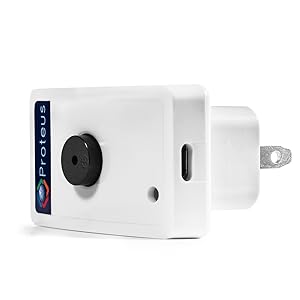
Proteus AMBIO
Measure. Log. Alert. And more!
Proteus AMBIO makes it easy to monitor temperature and humidity, set thresholds and get notified when alarms are tripped. Monitor from anywhere and get live data and historic graphs.

Compact Design
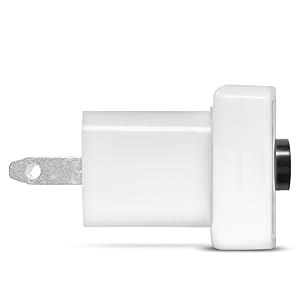
Proteus comes in a surprisingly compact feature rich package. Plug it right into a wall outlet (100-240V AC). No batteries to replace.
It connects directly to your wifi, with no additional hubs or gateways required. Oh, and it wont block your second wall outlet.
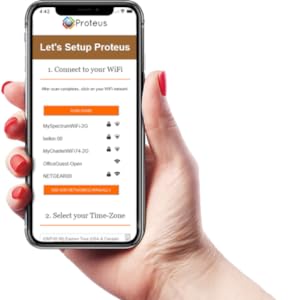
Easy To Setup
You can use your smart phone, tablet or a laptop to setup the sensor.
Power up your sensor.Connect your phone/ laptop to ProteusSetup-xxxxx network.Wait for setup screen to popup.Select your wifi, enter wifi password.Select timezone.Enter primary email.Save Settings.

Email, Text, Call Alerts
Add multiple emails and phones to your notification list and get alerts when alarms are tripped.
Call alerts are an optional paid feature that you can enable on the cloud
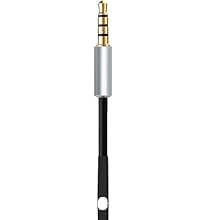
External Probe For Enhanced Accuracy
Proteus Ambio comes with a plug-in external Temperature/ Humidity probe for high accuracy readings. The probe is 3 inch long but can be extended upto 12 ft using TRRS extension cords..
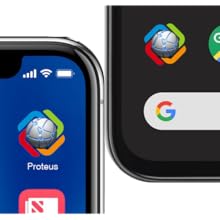
Need an APP?
Proteus is designed to work with or without an App. Need one? We have one for both android and iOS devices. Don’t want to install any more apps? Simply use a browser to view your sensors. Best of both worlds.
Multiple WiFi Networks, APIs
Program upto two WiFi Networks during setup, and Sensor will automatically pick the network with best signal strength.
Proteus also supports API calls for accessing data directly from a server or your custom applications.
Rich with Features, Designed with Simplicity.
Configurable, Built-in Buzzer, Optional External Buzzer
Proteus comes with a loud built-in buzzer rated at ~85 dB. This can be compared to the loudness of a household carbon monoxide alarm buzzer.
For applications requiring additional audible alarm range, the base unit can be connected to an external 115db siren via the micro USB port.
Notify on power or wifi outages
Proteus brings the smarts when there are power or wifi issues with the sensor. It will let you know if the sensor fails to send data to the cloud due to power, wifi or internet issues.
Want to ignore short outages?
You can program a time window, any outages shorter than this window will be ignored. A minimum 10 minute delay is default to avoid such outages.
Data Logs, Graphs
View live and historic data as tables and zoomable graphs on the app or browser.
Notify Multiple Contacts
Add multiple emails and phones to be notified on alarm events. Get notified when alarm conditions are resolved.
Buzzer Configuration Options Turn Off buzzer completely. Email, text alerts will keep working Snooze buzzer automatically after a probrammable time interval Let buzzer keep beeping continuously when there is an alarm condition

Easy to Change WiFi Networks
Moving Homes? Changed your wifi password? No Problem. Simply reset your sensor by pressing the reset button for 6 seconds until you hear a single long beep. Now, go through the quick and easy setup process where you can select your new wifi network.
Is discontinued by manufacturer : No
Product Dimensions : 5.08 x 8.89 x 8.89 cm; 91 g
Date First Available : Dec 18 2016
Manufacturer : ProteusSensor.com
ASIN : B01AQ0PZFS
Item model number : PSHT07
Cloud connected WiFi Temperature Humidity sensor with NO monthly charges
Connects to your home or office wifi. No hub or gateway required.
Sends alerts by email/ text messages to multiple phones and emails.
Easy set up, with back mount power plugs directly into wall outlet
Programmable smart buzzer can be turned off after few minutes to avoid prolonged beep noise


Easy set up, works as advertised, and customer service is quick to respond if you have questions.
I purchased this product to alert me via email if the temperature in my house dropped below a certain value while away on vacation, indicating a problem with my furnace. It was a bonus that the Proteus sensor also measures humidity, and the Proteus Cloud can alert me to humidity, power, wifi, and/or network connection issues, along with temperature alerts, all at no additional cost.It only took about 5 minutes to set up the Proteus temperature/humidity sensor. Following the included instructions made it a quick and simple task. My internet provider is Rogers in Ontario, and there were no issues with the Proteus sensor connecting to my Rogers XB7 Ignite WiFi Gateway (Gen2).I did contact Proteus customer support with a couple of questions before I made my purchase and they responded quickly the same day. Would highly recommend!
Paid for itself immediately!! Greenhouse approved!
Purchased to monitor greenhouse temperature, worked so well I bought a 2nd one. Will update long term review during winter. So far best value for an relatively inexpensive temperature monitoring device. Hope to purchase more. App was free and easy to set up with lots of customizable alarm options, can send alert by text to your phone. Saved a greenhouse from freezing when a heater failed.UPDATE: sensors are still working great more than a year later and surviving well in commercial greenhouses. We will be purchasing more!
Simply works.
Easy to set up and gives accurate real-time updates as well as historical data. Perfect for monitoring house temp when away.h1q
Excellent to temperature monitoring
I have these in various rooms for work around my facility, and at offsite facility in rooms where we need to track temperatures.They are great. Make sure you have wifi near where you want them , the alerts and the timing and interface is all quite easy to figure out. I couldn’t recommend these more for freezer and cold room areas that need to be monitored.love the alerts to get me ahead of the repair curve as well.
Works Well, Seems to interact with cloud acct quickly
Put this in a small computer room to monitor temps just to make sure cooling system is on the job. Added bonus, good for monitoring power and WiFi failures. Setup was pretty easy, used smartphone WiFi to initially connect to it to get it to connect to the building’s own WiFi, and from there setup a Proteus cloud account. It all took just a few minutes (even with having to authorize the device’s MAC on our WiFi system). Decent range of 5 different logging options from 1min increments X 24 hrs up to 30min increments by 30 days. Changes to the cloud settings update to the device pretty quickly, like changes to alarm settings. Setting up text and email alerts were also easy and work well (for text alerts, your provider needs to support SMS email gateway, most like Rogers, Bell, Telus and others do but whether your individual plan allows it would be the question). The alerts originate from the cloud service, so if the local network goes down the power/WiFi fail alert can still be sent. There are 3 kinds of alerts possible, temperature, humidity, and power/WiFi fail. The device has a beeper when an alarm goes off. It’s fairly loud and can be heard even several rooms away with doors closed. There are more advanced notification and logging options but I think this requires a paid upgrade to the account (longer more detailed logs, Alexa and IFTTT, etc). The included logging and notifications are more than good enough for me.
If you have an issue resetting device
Had the device (which works great) for about a year and then it lost connection (via an alert to both my phone (txt) and email). Thought it was because I’d made some wifi changes but when I tried to reset the device (hold down reset button for 5 seconds) nothing happened. Tried a bunch of different changes and then I noticed that the device connects to a regular power outlet via a USB adaptor. Unplugging this adaptor and connected the device directly to my laptops USB and within 20 seconds, I got an alert on my phone (and email) that the Proteus is connected again!!!! I’ve now changed the USB adaptor (just one of the many I have lying around – think it was an old samsung phone one) and device continues to work.As far as having the device – this is to monitor the temperature in our cabin (which has a furnace running throughout our cold Alberta winters) to let me know if my 35 year old furnace ever packs it in – it does this well (and I sometimes use the app to check in) and as previously mentioned, sends me a message if the device fails to connect (which lets me know to tell a neighbour to check my cabin while I’m not there – though the few times this has happened, it’s all been because the power in the neighbourhood went out and when it comes back on, the proteus sends me a message to let me know it’s working again).
This was pretty useless we thought
Posted a pic here. This is all that was in the box but if you go to UTube and watch the install video, that one has a black cord and something else as well. We did not get that. Just this tiny, tiny little sensor and this small black thing that detects the water although how the heck we are supposed to plug this in to the socket for power without that black cord on UTube is a mystery. For the price charged there is nothing to it at all and it is very, very disappointing. When I opened the box my words were “that’s it?” Yep, that was it. Sent the product back. We would have had to find an extension cord and it just would not have worked for our needs. Very disappointing. Amazon have refunded us back but tiny and expensive for what it is.
Great device!
This device works well! Monitors temperature & humidity as well it lets me know when the power goes out & when itâs back on. Easy to set up & use too. Peace of mind for anyone living in a rural setting.
My old freezer failed twice, losing all my food. Never again! This thing is amazing. No special apps (can still easily set up with phone), informs of wifi or power outages, can set notification thresholds for temp and humidity, text + email alerts, and a loud alarm (which you can deactivate of desired). Worth every penny.Tip: for freezers, get a USB extension cord to run through the door opening. It will be too thick for the door to seal, so strip the outer insulation, leaving the insulation on the wires inside. Flatten those out going through the door. Secure with duct tape (or gaffers tape, if concerned with residue). Then build up around it slightly with duct tape (just enough to smooth the bump) so the door seals without gaps. Or if you have an older/cheap freezer (mine was brand new), drill a hole somewhere safe, run wire, then fill with spray foam. Follow these tips at your own risk (shorting wires can cause fire, drilling through freezer can be hazardous).
Really easy to set up. Needs a WiFi connection so – just as with other smart devices it creates it’s own WiFi network that you connect to for setup.You then set up a free account on their website and configure the temperature and humidity thresholds.We have it in our server room and it is tested and working fine.Can send alert emails to multiple email addresses.Alarm is quite loud which is great.Much smaller than it appears in the pictures.Thankfully no explosions as suggested in another review. Don’t let that deter you.No more overheating servers when the Air Con goes off.All set up within 20 minutes.
Zuverlässiger Ãberwacher. Wir verwenden es um bei Abwesenheit über einen Heizungsausfall informiert zu werden.
A very simple piece of tech, that is equally simple to use.Can not recommend highly enough.
So far…. perfect!! Does exactly what I need it to. Ok it’s a bit expensive and comes with a UK conversion plug, which is a bit lame, but it works and works well. If you want to monitor temperature and humidity reliably and over wifi, this is for you.